
System FOFR provides group of services for online cooperation with our bussiness partners and custommers.
Services for data import orders, tracking and related matters of shipments.
Services can be called from any IP address, but the maximum number of queries for each service is limited to 1500 per day.
After that, the service is denied and returns text information about exceeding the limits.
In justified cases it is possible to request that this limit be raised for your IP.
- 11 – Price calculation FOFR complete definition including goods
- 12 – Returning the scanned shipment confirmation
- 14 – Track & trace
- 15 – Distance and codes of fofr centres according to ZIP
- 16 – Shipment tracking and tracing – text format with separator
- 17 – Shipment tracking and tracing – return the status of multiple shipments at once csv or xml format
- 18 – Shipment tracing – xml format for the service KdeJeBalík.cz
- 21 – Bulk sending of cash on delivery by the clearing house FOFR
- 22 – Importing data into the online system FOFR NetSpedice
- 50 – Description of printed labels for FOFR system
- 51 – List of statutes FOFR
- 52 – List of countries for importing data into the FOFR online system
- 53 – Code list of FOFR district for the Czech Republic
- 54 – Code list of district for Slovakia (for sticker printing only)
- 55 – List of recommended packaging codes
- 56 – List of FOFR depots
- 57 – ADR code list by UN number
11 – Price calculation FOFR complete definition including goods
Recommended: SOAP – Web service: https://info.tfw.cz/import-objednavek-netspedice/2/#prepravaInfo
https://objednavky.fofrcz.cz/procedure/spocitej-fofr-cenu-xml.php?
Parameters:
- company_center = CB // the FOFR centre under which the customer of the transport belongs
- firm_id = 20126 // FOFR firm ID
- psc_od = 37001 // loading zip code
- psc_do = 62000 // unloading zip code
- goods = 2 25 0,35 PALETA 0,45 0,12 0,7T^ 3 55 KARTON 0,12 0,7T 333123T (detail description down below)
- dobirka = 500 // cash on delivery value
- modul = F // requested transport mode (optional)
The result is returned in XML format.
If the price is calculated in the element, all the parameters are filled in correctly.
In the REQUEST section is a summary of the input parameters in the RESPONSE section are the resulting values.
<?xml version="1.0" encoding="utf-8"?>
<FOFR>
<REQUEST>
  <COMPANY_ID>20126</COMPANY_ID>
  <COMPANY_CENTER>CB</COMPANY_CENTER>
  <ZIP_FROM>37001</ZIP_FROM>
  <ZIP_TO>62000</ZIP_TO>
  <COD>500</COD>
  <GOODS>    2         25   0,35  PALETA  0,45  0,12   0,7T^        3     55         KARTON            0,12   0,7T333123T</GOODS>
  <MODUL>C</MODUL>
</REQUEST>
<RESPONSE>
  <CENTER_FROM>CB</CENTER_FROM>
  <CENTER_TO>BR</CENTER_TO>
  <PRICE_WITH_VAT>224.70</PRICE_WITH_VAT>
  <PRICE_WITHOUT_VAT>185.70</PRICE_WITHOUT_VAT>
  <PRICE_COD>10.00</PRICE_COD> price for cash on delivery – this amount is already included in the price
  <GOODS_TOTAL_WEIGHT>80.00</GOODS_TOTAL_WEIGHT>
  <GOODS_TOTAL_VOLUME>0.3500</GOODS_TOTAL_VOLUME>
  <GOODS_TOTAL_COLLI>5</GOODS_TOTAL_COLLI>
  <DISTANCE_KM>193</DISTANCE_KM> (logistic distance)
  <SELECTED_MODUL>C</SELECTED_MODUL>
</RESPONSE>
</FOFR>
Items must be defined using fixed column lengths, empty characters can be filled with zeros, spaces or the @ sign for numeric fields (suitable for readable url writing). Alignment within a column may be from the right or from the left. The ^(canopy) character is used as a separator for each line of goods.
The maximum number of rows for calculating goods in the FOFR system is 9.
Each row can contain a maximum of 99 items of the same packaging.
The weight and volume can be given for total pieces or for a single piece, distinguished by the parameter HMOBJ_CELKEM,
where T = total weight and volume for all pieces for a given row, F = weight and volume for 1 piece, multiplied by the number of pieces.
If you do not know some information about the goods, please send only the total number of pieces and weight.
If the goods are defined significantly differently from reality, the shipment will be reweighed/remeasured.
Use a comma as a decimal separator.
Description of the goods definition fields:
PIECES(5), WEIGHT(7), VOLUME(7), PACKING(8), LENGTH(6), HEIGHT(6), WIDTH(6), HMOBJ_TOTAL(1), ADR_UN(7), ADR_GROUP(3), IS_ENVELOPE(1)
For example:
2 25 0,35 PALETA 0,45 0,12 0,7T^ 3 55 KARTON 0,12 0,7T 333123
The example above shows 2 rows of goods on the first is:
2 pieces 25 kg 0,35m3 packing PALETTE with dimensions 0,45×0,12×0,7 weight and volume is given for 2 pieces in total
2nd row:
3 pieces 55 kg without specified volume of packing KARTON, width 0,12 and length 0,7 all specified in total and following the definition of ADR, it means that ADR surcharge will be added to the price
Returning the scanned shipment confirmation -12
Returns:
Content-Type: image/jpeg
Track & trace – 14
https://objednavky.fofrcz.cz/index.php?id=sledovani&rok=2021&shipment_num=3316506113
Distance and codes of fofr centres according to ZIP – 15
https://objednavky.fofrcz.cz/vzdalenost.php?pscodes=69801&pscprij=81101¢re_origin=OV
UH^UH^15 (do roku 2018) – The data is loaded from the codebook of the specific branch according to the first page.
https://objednavky.fofrcz.cz/kody-a-vzdalenost.php?pscodes=37001&pscprij=81101¢re_origin=CB
UH^SK^300^S2 The data is loaded from the codebook of the specific branch according to the first page. The result returns the text of the resort code for pscodes, pscprij and the theoretical distance in km for the price calculation in the fofr tariff. This is important, for example, for the actual printing of FOFR labels, where it is necessary to provide the code of the establishment, filing and delivery centres.
Exception – Branch code for postage to/from Slovakia.
This code (in this case S2) should only be used for printing stickers and
the SK code should still be uploaded to the data and barcodes.
Shipment tracking and tracing – text format with separator – 16
^OL^2017-01-12^OL/D/1/88-svážená - MAREK Jaroslav 734853638-^
^OL^2017-01-12^OL/P/1/9-přepravovaná - Vavřiník Martin = CP !!!!! 605756678-^
^CP^2017-01-12^CP/P/1/9-převzatá - Vavřiník Martin = CP !!!!! 605756678-^
^CP^2017-01-12^CP/T/1/171-přepravovaná - -^
^CB^2017-01-13^CB/T/1/171-převzatá - -^
^CB^2017-01-13^CB/D/1/62-rozvážená - Michal Kubíček 736 520 747-^
^CB^2017-01-13^CB///-odeslaná placená SMS - -^
^CB^2017-01-13^CB/D/1/62-doručená - Michal Kubíček 736 520 747-^
Shipment tracking and tracing – return the status of multiple shipments at once csv or xml format – 17
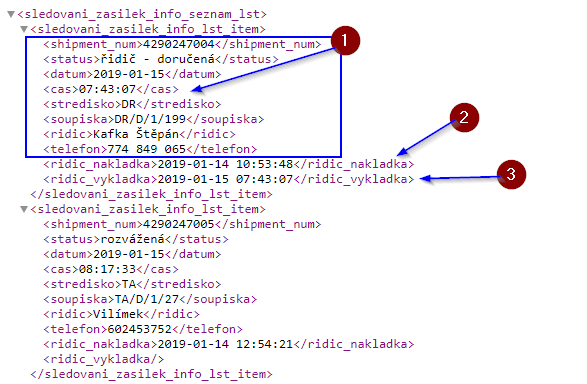
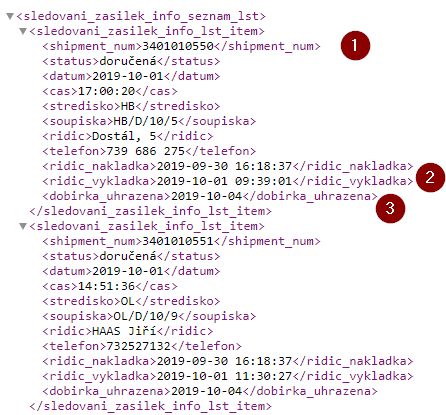
1 – information about the last status of the shipment
2 – elements for the time of the event and, if there is data from the driver’s application, the date and time of receipt, handover of the shipment to the customer
3 – date of payment of the COD by the clearing house

Shipment tracing – xml format for the service KdeJeBalík.cz -18
https://objednavky.fofrcz.cz/procedure/track_and_trace_sledovani_zasilek.php?shipment=3319181043
<trackandtrace>

  <FOFR ID="6090013481" CentreOrigin="PL" CentreFrom="PL" CentreTo="OV" Code="" Colli="1" Weight="100.00" Volume="0.000">

    <Statuses>

      <Status StCode="1" StDate="2014-7-21 8:34" Depo="PL" Kontakt="Kratochvíl" StInfo=""/>

      <Status StCode="4" StDate="2014-7-21 17:50" Depo="PL" Kontakt="Kalcovský" StInfo=""/>

      <Status StCode="2" StDate="2014-7-22 0:36" Depo="CP" Kontakt="Kalcovský" StInfo=""/>

      <Status StCode="4" StDate="2014-7-22 0:39" Depo="CP" Kontakt="" StInfo=""/>

      <Status StCode="3" StDate="2014-7-22 1:26" Depo="CP" Kontakt="" StInfo=""/>

      <Status StCode="3" StDate="2014-7-22 1:26" Depo="CP" Kontakt="Kalcovský" StInfo=""/>

      <Status StCode="16" StDate="2014-7-22 5:22" Depo="CP" Kontakt="Inventura CP" StInfo=""/>

      <Status StCode="4" StDate="2014-7-22 18:43" Depo="CP" Kontakt="" StInfo=""/>

      <Status StCode="2" StDate="2014-7-23 7:36" Depo="OV" Kontakt="" StInfo=""/>

      <Status StCode="5" StDate="2014-7-24 7:58" Depo="OV" Kontakt="Uhlíř Vladimír 739 452 476" StInfo=""/>

      <Status StCode="6" StDate="2014-7-24 16:28" Depo="OV" Kontakt="Uhlíř Vladimír" StInfo=""/>

    </Statuses>

  </FOFR>2p1i4b

</trackandtrace>
Bulk sending of cash on delivery by the clearing house FOFR – 21
If the customer has multiple CODs per day, it is possible to combine these CODs into one bulk payment and send it to the sender’s account. At the same time, an email is created and information is sent about what shipments are included in the bundled payment. Pooling of COD payments is only possible by arrangement with the COD settlement centre dispatcher, contact here.
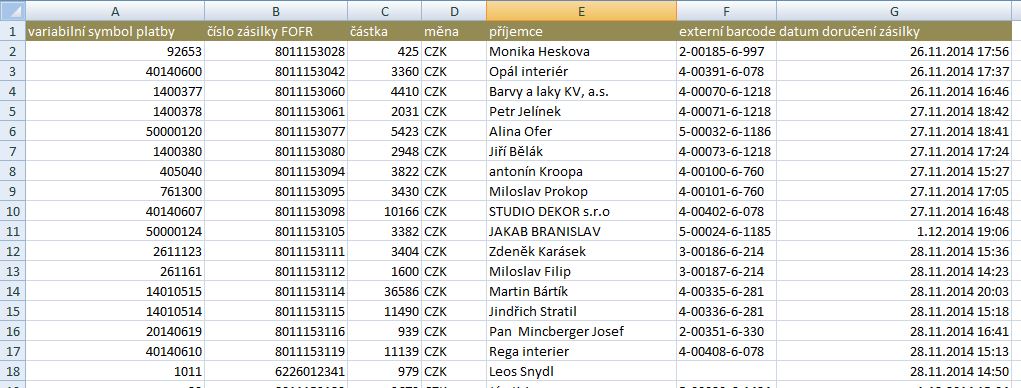
The file sent is in csv format and contains the following fields:
- Variable payment symbol
- Shipment number FOFR
- Amount
- Currency
- Recipient
- External barcode (for SK)
- Date of delivery
example file here:
https://info.tfw.cz/wp-content/priklady_souboru/320135.csv
Importing data into the online system FOFR NetSpedice – 22
Description of printed labels for FOFR system – 50
https://info.tfw.cz/polepka-zbozi-pro-prepravni-system-fofr/
List of statutes fofr– 51
Seznam stavů, které vrací online služby pro pohyb zásilky fofr:
0 – registered
1 – on collection
2 – taken over
3 – stored
4 – transported
5 – in transit
6 – delivered
7 – unloaded
8 – lost
9 – cancelled
10 – incorrectly unloaded
11 – undelivered
12 – centre transported
13 – missing
14 – additional loading
15 – change of goods
16 – Inventory of goods
17 – not consigned
18 – on consignment (abroad)
19 – on delivery (abroad)
21 – taken over on another vehicle
22 – registered in the SDS partner system (Slovakia)
35 – return of consignment
40 – damaged
41 – unprocessed
42 – logged zero action
43 – goods scanned in storage
45 – temporarily not registered CP
46 – paid SMS sent
47 – damage record created
50 – cash payment by credit card on collection
51 – cash payment by credit card on delivery
60 – delivered – returned to sender
71 – driver – received
72 – driver – delivered
73 – driver – customer not intercepted
74 – driver – no cash
75 – driver – agreement another date
76 – driver – damaged parcel
77 – driver – not accepted by customer
78 – driver – wrong address
79 – driver – other non-objective reason
80 – driver – incomplete consignment
90 – STORNO – cancelled shipment
List of countries for importing data into the FOFR online system– 52
- Belgie
- Bosna a Hercegovina
- Chorvatsko
- Dánsko
- Finsko
- Francie
- Itálie
- Lucembursko
- Makedonie
- Maďarsko
- Nizozemsko
- Norsko
- Německo
- Polsko
- Portugalsko
- Rakousko
- Slovensko
- Slovinsko
- Srbsko
- Velká Británie
- Španělsko
- Švédsko
- Černá Hora
- Česká republika
Code list of FOFR district for the Czech Republic – 53
Online retrieval from NetSpedice database (last change 1.1.2022)
for correct determination of FOFR district it is possible to use the offline dialer here:
xml – https://objednavky.fofrcz.cz/obvody/fofr/xml
csv – https://objednavky.fofrcz.cz/obvody/fofr/csv
txt – https://objednavky.fofrcz.cz/obvody/fofr/txt
html – https://objednavky.fofrcz.cz/obvody/fofr/html
Code list of district for Slovakia (for sticker printing only) – 54
Online retrieval from NetSpedice database (last change 1.1.2022)
for correct determination of district in Slovakia only for printing fofr labels it is possible to use offline dialer here:
xml – https://objednavky.fofrcz.cz/obvody/fofrsk/xml
csv – https://objednavky.fofrcz.cz/obvody/fofrsk/csv
txt – https://objednavky.fofrcz.cz/obvody/fofrsk/txt
html – https://objednavky.fofrcz.cz/obvody/fofrsk/html
List of recommended packaging codes – 55
Maximum size of 6 characters, anything can be written in the code, except for special types of packaging.
- COLLI – generic name for any packaging
- BALÍK
- KARTON
- BEDNA
- KBELÍK
- KRABIC
- PNEU
- PYTEL
- ROLE
- SOUDEK
- SUD
- SVAZEK
Special types of packaging with relevance to price calculation or module determination:
(For module B parcel, a packaging type with the meaning of pallet or europallet cannot be used.)
- V-EUR – returnable europallet
- P-EUR – non-returnable europallet for pallet module
- P-PAL – non-reversible non-standard pallet for pallet module
- PALETA – non-standard palette
- OBÁLKA – the envelope attached to the shipment
- VRATDL – code for the return delivery note to the sender – as these are goods, only the minimum weight needs to be indicated here
- VROBAL – code for returnable packaging within the FOFR system to the sender (chargeable service)
List of FOFR depots 56
xml – https://objednavky.fofrcz.cz/seznam-dep/xml
xml – https://objednavky.fofrcz.cz/seznam-dep/xml2 – identický formát jako zásilkovna
html – https://objednavky.fofrcz.cz/seznam-dep/html
csv – https://objednavky.fofrcz.cz/seznam-dep/csv
ADR code list by UN number – 57
txt – https://objednavky.fofrcz.cz/seznam-adr/txt
csv – https://objednavky.fofrcz.cz/seznam-adr/csv
xml – https://objednavky.fofrcz.cz/seznam-adr/xml
html – https://objednavky.fofrcz.cz/seznam-adr/html